The KoboldCpp launcher, tab by tab
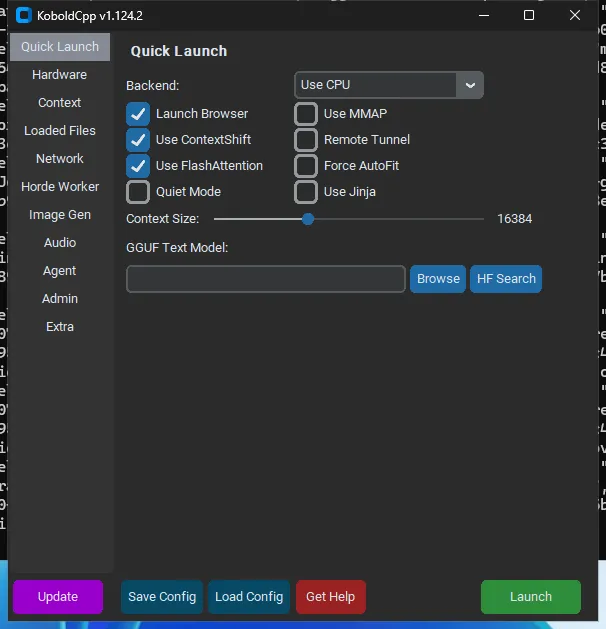
The launcher is the settings window that opens when you start KoboldCpp without a model. It has 11 tabs, from Quick Launch to Extra; for most people only Quick Launch matters: choose the backend for your GPU, pick a GGUF model, leave GPU layers on auto and context at 16384, and press Launch. Every field writes a command-line flag, and Save Config stores them all in a .kcpps file.
Checked against KoboldCpp 1.124.2 · updated 13 Nov 2026
- lab-lnx: Linux test VM · 4 vCPU · 15 GB · no GPU
- gha-w25: Windows Server 2025 test machine · 4 vCPU · 16 GB · no GPU
- gha-w22: Windows Server 2022 test machine · 4 vCPU · 16 GB · no GPU
On this page
- When the KoboldCpp launcher appears (and how to skip it)
- The interactive launcher map
- The bottom buttons
- Quick Launch: the only tab most people need
- Hardware
- Context
- Loaded Files
- Network
- Horde Worker, Image Gen, Audio, Agent, Admin
- Horde Worker
- Image Gen
- Audio
- Agent
- Admin
- Extra
- “Use X” boxes write “—noX” flags
- Fields with no launcher equivalent
- Best settings for your setup
- Launcher problems
When the KoboldCpp launcher appears (and how to skip it)
The launcher opens when you start the program with no model and no config, for example by double-clicking koboldcpp.exe. Never shows the GUI launcher (headless start); overrides --showgui.Default falseSince v1.15All details never shows it. Shows the GUI launcher even when a config was passed, pre-filled with those settings.Default falseSince v1.75All details shows it even when a .kcpps file was given, pre-filled with that file’s values (upstream). Over SSH or on a machine with no display it fails: in our Linux test with no display and no model it printed Warning, GUI failed to start: Reason: no display name and no $DISPLAY environment variable and exited with code 2 F59. Use flags instead: flags and Linux.
The interactive launcher map
Click a numbered dot to see what a field does, the flag it writes and its default. This map covers Quick Launch, the tab most people need; the other ten tabs follow with a screenshot and a table of every field. The window had 11 tabs on 1.124.2 F30.
The bottom buttons
| Launch | Applies the fields to the arguments and starts the server. |
| Update | Opens the releases page to check for a newer version. It does not replace the file. |
| Save Config | Writes the current fields to a .kcpps file. |
| Load Config | Reads a .kcpps or .kcppt file into the fields. |
| Get Help | A help menu with links to the wiki and starter guides, Hugging Face search, and Newbie Templates. |
The Newbie Templates are .kcppt presets labelled for about 6, 12 and 24 GB of video memory (upstream). On a 1024 by 768 test screen the bottom buttons are cut off, so we do not show them in a screenshot; they are visible in the Quick Launch shot above at 100% scaling.
Quick Launch: the only tab most people need
| Backend (dropdown: Use CPU / Use CUDA / Use hipBLAS (ROCm) / Use Vulkan / Use CPU (Old CPU) / Use Vulkan (Old CPU) / Use Vulkan (Older CPU) / Failsafe Mode (Older CPU); only options whose library ships in the binary are listed) | --usecpu / --usecuda / --usevulkan / --noavx2 / --failsafe | false |
| GPU ID | device argument of --usecuda N / --usevulkan N | |
| GPU Layers (layer-count hint shown next to it) | --gpulayers (empty = -1 = autofit) | -1 |
| Use MMQ (CUDA only) | unchecked → --nommq | false |
| Launch Browser | --launch | false |
| Use MMAP | --usemmap | false |
| Use ContextShift | unchecked → --noshift | false |
| Remote Tunnel | --remotetunnel | false |
| Use FlashAttention | unchecked → --noflashattention | false |
| Force AutoFit | --autofit | false |
| Quiet Mode | --quiet | false |
| Use Jinja | --jinja | false |
| Context Size (slider) | --contextsize | 16384 |
| GGUF Text Model + "HF Search" button | --model (the button opens a Hugging Face GGUF search) |
Field notes, with what we measured:
- Backend: shows “Use CPU” on a machine with no GPU F30. Picking CUDA on a PC without NVIDIA still runs on the CPU, without an error F17.
- GPU Layers: empty means automatic. See GPU layers.
- Context Size: the default is 16384 F05, and KoboldCpp adds 256 F06. Memory cost: RAM rose from 616 MB at 2K to 976 MB at 32K on our small model F11.
- FlashAttention: already on by default F09.
- Use MMAP: off by default; on Windows it lowers the reported working set F12.
Hardware
| Backend, GPU ID | same as Quick Launch | |
| No KV offload | --lowvram | false |
| Use MMQ | unchecked → --nommq | false |
| SplitMode (layer/row/tensor) | --splitmode | layer |
| GPU Layers | --gpulayers | -1 |
| Autofit Padding (MB) | --autofitpadding | 1024 |
| Tensor Split (comma list) | --tensor_split | |
| Main GPU | --maingpu | -1 |
| Threads | --threads | 2 |
| Batch Threads | --blasthreads | 0 |
| Device Override (e.g. Vulkan0,Vulkan1) | --device | none |
| Launch Browser | --launch | false |
| High Priority | --highpriority | false |
| Use MMAP | --usemmap | false |
| Use mlock | --usemlock | false |
| Debug Mode | --debugmode | 0 |
| Direct I/O | --usedirectio | false |
| Keep Foreground (Windows) | --foreground | false |
| CLI Terminal Only | --cli | false |
| Batch Size (slider) | --batchsize | 512 |
| Physical Batch Size (slider) | --ubatchsize | -1 |
| Use FlashAttention | unchecked → --noflashattention | false |
| Force AutoFit | --autofit | false |
| Run Benchmark (button) | runs the equivalent of --benchmark | none |
- Threads: automatic used half of the 4 virtual CPUs on our test machines, and 4 threads were faster by 6 to 30 percent F07. A real desktop may behave differently, so we have no desktop advice yet.
- No KV offload is Keeps the KV cache in system RAM instead of VRAM (llama.cpp -nkvo). Fits more layers but is slow.Default falseLauncher Hardware tab: No KV offloadSince v1.100All details: it keeps the cache in system RAM and is slow.
- Tensor Split, Main GPU, SplitMode: for several GPUs. See multi-GPU.
- Run Benchmark fills the whole context and writes one CSV row with processing and generation speeds F16.
See speed.
Context
| Use FastForwarding | unchecked → --nofastforward | false |
| Use ContextShift | unchecked → --noshift | false |
| Use SmartContext (marked outdated) | --smartcontext | false |
| Allow SWA | unchecked → --noswa | false |
| SWA Padding Tokens | --swapadding | 0 |
| Use SmartCache + CacheSlots | --smartcache [slots] | |
| Context Size (slider) | --contextsize | 16384 |
| Default Gen Amt | --defaultgenamt | 2048 |
| Prompt Limit | --genlimit | 0 |
| Default Params (JSON) + Override | --gendefaults + --gendefaultsoverwrite | none |
| Custom RoPE Config / Manual Rope Scale, RoPE Scale, Base, Override Native Context | --ropeconfig scale base / --overridenativecontext | 0 |
| Quantize KV Cache (slider) | --quantkv | f16 |
| No BOS Token | --nobostoken | false |
| Enable Guidance | --enableguidance | false |
| Use Jinja | --jinja | false |
| Jinja Thinking (default/true/false) | --jinjathink | default |
| Jinja Kwargs | --jinja_kwargs | |
| Think Effort | --reasoningeffort (applied through gendefaults by the GUI) | default |
| MoE Experts | --moeexperts | -1 |
| MoE CPU Layers | --moecpu | 0 |
| FFN CPU Layers | --ffncpu | 0 |
| Override KV | --overridekv | none |
| Override Tensors | --overridetensors | none |
| Lazy Tensors (auto/on/off) | --lazy-mode | auto |
| MoE Cache MiB | --moe-cache-mib | 0 |
Quantize KV Cache saves memory at long context: peak RAM at 32K was 976 MB with the default, 794 MB with q8_0 and 698 MB with q4_0 F10. The default generation length is 2048 F05. SmartContext is outdated; do not use it. See context size and chat templates.
Loaded Files
| Text Model + HF Search | --model | |
| Text Lora + Multiplier | --lora, --loramult | none |
| Mmproj File (vision/audio) | --mmproj | none |
| Vision MaxRes | --visionmaxres | 1024 |
| V.Min/Max Tok | --visionmintokens, --visionmaxtokens | -1 |
| V.Force CPU | --mmprojcpu | false |
| Draft Model | --draftmodel | none |
| Draft Amount / Splits / Layers | --draftamount, --draftgpusplit, --draftgpulayers | 4 |
| Use MTP | --usemtp | false |
| Embeds Model + ECtx + GPU | --embeddingsmodel, --embeddingsmaxctx, --embeddingsgpu | none |
| Preload Story | --preloadstory | none |
| SaveData File + "Enable Server Side SaveData File" | --savedatafile | none |
| MCP JSON | --mcpfile | none |
| Chat Adapter + "Pick Premade" | --chatcompletionsadapter (empty = AutoGuess) | AutoGuess |
| Jinja Template | --jinjatemplate | none |
| Download Dir | --downloaddir | none |
| Allow Launch Without Models | --nomodel | false |
Text model, LoRA (GGUF only), the vision projector (vision), a draft model (speed), an embeddings model (embeddings), preload story and save-data file (Lite), the chat adapter (empty means automatic F05) and the download directory.
Network
| Host / Port | --host / --port | none |
| Remote Tunnel | --remotetunnel | false |
| Quiet Mode | --quiet | false |
| NoCertify Mode (Insecure) | --nocertify | false |
| Shared Multiplayer | --multiplayer | false |
| Enable WebSearch | --websearch | false |
| SSL Cert / SSL Key | --ssl cert key | |
| Password | --password | none |
| Queue Limit | --queuelimit | 10 |
| Max Req. Size (MB) | --maxrequestsize | 32 |
| IP Rate Limiter (s) | --ratelimit | 0 |
| Request Timeout (s) | --reqtimeout | 600 |
| Parallel Requests / Parallel Total Context | --parallelrequests / --paralleltotalcontext | 1 |
| RPC Mode (disabled/connect/host) | --rpcmode | disabled |
| RPC Endpoints (connect) | --rpctargets | none |
| RPC Host IP / Port / Devices / Cache (host) | --rpchost, --rpcport, --rpcdevice, --rpccache | 0.0.0.0 |
The default port is 5001 F05. The default queue serves one request at a time; with two parallel requests both finished together, but the total time on CPU was the same F26.
Horde Worker, Image Gen, Audio, Agent, Admin
Horde Worker
| Configure for Horde (toggle) | turns on the fields below | |
| Horde Model Name | --hordemodelname | none |
| Gen. Length | --hordegenlen | 0 |
| Max Context | --hordemaxctx | 0 |
| API Key (If Embedded Worker) | --hordekey | none |
| Horde Worker Name | --hordeworkername | none |
Share your model with the community AI Horde: AI Horde.
Image Gen
| Image Model (safetensors/gguf) | --sdmodel | none |
| Compress Weights | --sdquant | 0 |
| ImgThreads | --sdthreads | 0 |
| ImgGPU | --sdmaingpu | none |
| Clamp Resolution (Hard) / (Soft) | --sdclamped / --sdclampedsoft | 0 |
| Runtime LoRAs toggle; Image LoRAs + Multiplier, or LoRA Dir | --sdlora, --sdloramult | none |
| Image LLM | --sdllm | none |
| Clip-1 File / Clip-2 File | --sdclip1 / --sdclip2 | none |
| PhotoMaker | --sdphotomaker | none |
| Upscaler (ESRGAN) | --sdupscaler | none |
| Image VAE | --sdvae | none |
| Audio VAE (LTX video) | --sdaudiovae | none |
| Automatic VAE (TAE SD) | --sdvaeauto | false |
| Conv2D Direct | --sdconvdirect | off |
| VAE Tiling Threshold | --sdtiledvae | 512 |
| SD Flash Attention | --sdflashattention | false |
| Model Offload | --sdoffloadcpu | false |
| VAE dev / CLIP dev | --sdvaedevice / --sdclipdevice | none |
| VRAM Limiter (MB) | --sdvramlimit | 0 |
Image generation works on a CPU with small models F40: image generation.
Audio
| Audio Transcription (Whisper .bin or SheetSage2 .gguf) | --whispermodel | none |
| TTS Model | --ttsmodel | none |
| TTS Threads / TTS Max Tokens | --ttsthreads / --ttsmaxlen | 0 |
| TTS Use GPU | --ttsgpu | false |
| WavTokenizer Model | --ttswavtokenizer | none |
| TTS Voices Dir | --ttsdir | none |
| MusicLLM / MusicEmbeds / MusicDiffuser / MusicVAE | --musicllm / --musicembeddings / --musicdiffusion / --musicvae | none |
| Music Low VRAM | --musiclowvram | false |
Speech and text-to-speech: voice.
Agent
| Launch KoboldCpp Agent | --agent | false |
| Load Agent Session | --agentload | none |
The README says the agent starts from the Admin tab, but in 1.124.2 it has its own Agent tab (upstream). See embeddings, MCP and web search.
Admin
| Enable Model Administration | --admin | false |
| Admin Password | --adminpassword | none |
| Config Directory (Required) | --admindir | none |
| Base config .kcpps (Optional) | --baseconfig | none |
| Auto Unload Timeout | --adminunloadtimeout | 0 |
| SingleInstance Mode | --singleinstance | false |
| Router Mode | --routermode (only takes effect with admin on) | false |
| Autoswap Mode | --autoswapmode (needs admin and router) | false |
| Autoswap Threshold (MB) | --autoswapthreshold | 256 |
Admin mode lets you switch models without restarting: .kcpps files.
Extra
| Item | Equivalent | |
| Unpack KoboldCpp To Folder | --unpack DIR | |
| Generate LaunchTemplate | --exporttemplate FILE (.kcppt) | |
| Analyze Model | --analyze FILE | |
| File Extensions Handler: Register / Unregister (Windows) | Associates .kcpps/.kcppt/.ggml/.gguf with KoboldCpp | |
| Use Classic FilePicker (Linux) | Uses the Tk dialog instead of Zenity/YAD | |
| Spawn Terminal Logs (Linux) | Opens a secondary console viewer |
Unpack To Folder, Generate LaunchTemplate (a .kcppt file: .kcpps files), Analyze Model, and on Windows the File Extensions Handler (Windows). On Linux there are two extra options, a classic file picker and “Spawn Terminal Logs”.
“Use X” boxes write “—noX” flags
Five checkboxes are inverted: leaving them ticked writes nothing, and unticking one writes a flag that turns it off. This matters when you read old guides and configs.
| Use ContextShift | --noshift |
| Use FastForwarding | --nofastforward |
| Use FlashAttention | --noflashattention |
| Allow SWA | --noswa |
| Use MMQ | --nommq |
Fields with no launcher equivalent
Some flags have no field in the launcher, such as Runs a benchmark instead of starting the server; optionally appends results to a CSV file.Default noneLauncher Hardware tab: Run Benchmark (button)Since v1.57All details. The full list is in flags.
Best settings for your setup
| CPU only | Threads: set to your number of physical cores. Everything else: default. | F07: up to 30% faster on four virtual CPUs (lab; desktops untested) |
| NVIDIA, 8 to 12 GB | Backend CUDA. Everything else: default. | default; no real-GPU test yet |
| AMD through Vulkan | Backend Vulkan. Everything else: default. | default; no real-GPU test yet |
Samplers are not launcher settings: see samplers. To build the command or a .kcpps for your setup, use the config builder.
Launcher problems
| What you see | Cause | Page |
|---|---|---|
| The window is too big or cut off on a high-DPI screen | Scaling (users report #1858); we have not tested it | it won’t start |
| It is slow to appear | The program unpacks itself first, and antivirus may scan it | first start |
Exception in Tkinter callback | A launcher error: use the command line | errors |
no $DISPLAY | No display | headless |
Frequently asked questions
What are the best KoboldCpp settings?
For most people the defaults: choose the backend for your GPU, leave GPU layers on auto and context at 16384, and change one thing at a time. The only measured change we can recommend is on a CPU: setting threads to the number of cores was up to 30 percent faster than the automatic choice on our test machines.
Can I use KoboldCpp without the GUI?
Yes. Give it a model with --model, or a saved .kcpps file with --config; the launcher only opens when you give neither, and --skiplauncher makes sure it never does.
How do I save my launcher settings?
Press Save Config at the bottom of the launcher. It writes every field to a .kcpps file that you can load again with Load Config or pass with --config.
What does "Use ContextShift" do?
It lets KoboldCpp drop old text from a full context instead of reading the whole prompt again. It is on by default. Unchecking it writes --noshift.
Should I turn on FlashAttention or MMAP?
FlashAttention is already on by default, and the flag changes nothing: our logs show it enabled without it. MMAP is off by default; turning it on lowered the reported working set on Windows only, in our test.
Why can't I see the GPU layers box?
In recent versions the box is hidden while GPU layers is on automatic, and KoboldCpp chooses the number for you. See the launcher notes in our guide to GPU layers.